Friday, September 9, 2016

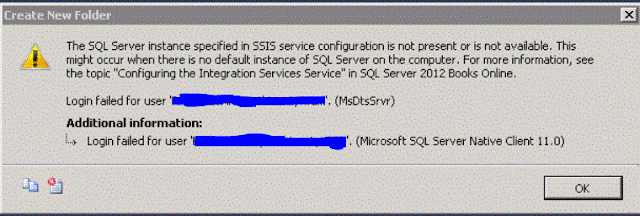
Login failed for user xxxxxxxxx. (MsDtsSrvr)

The SQL Server instance specified in SSIS service configuration is not present or is not available. This might occur when there is no default instance of SQL Server on the computer.  For more information, see the topic "Configuring the Integration Services Service" in SQL Server 2012 Books online

The developer today was trying to create a new folder in MSDB under the 'Stored Packages' in Integration services. However, he was getting the following error.

On this server we already had a named instance and Integration Services installed. I had recently created another instance for this developer to use and it looked like when he was trying to create the folder in the MSDB folder he was hitting the wrong database instance.

After some Google searches, I found some support pages that were related to this error.
https://msdn.microsoft.com/en-us/library/ms137789.aspx
https://indepthsql.wordpress.com/2012/03/15/ssis-error-the-sql-server-instance-specified-in-ssis-service-configuration-is-not-present-or-is-not-available-this-might-occur-when-there-is-no-default-instance-of-sql-server-on-the-computer-for-m/

The first step was to find this file called MsDtsSrvr.ini.xml. So I right clicked on Integration Services in SQL Server Configuration Manager and looked at the 'Service' tab. There you will find the 'Binary Path' for the Integration Services. You should be able to find that file under that directory. If not just do a file search.

It is typically located in %ProgramFiles%\Microsoft SQL Server\xxx\DTS\Binn. But depending on where you install the binaries this path will change. If you have a named instance then it will be different.

Edit this file in notepad and look for the following lines.

<Folder xsi:type="SqlServerFolder">
      <Name>MSDB</Name>
      <ServerName>.\NamedInstance</ServerName>
    </Folder>

The item highlighted in Red will be the Database Instance under whose MSDB Database the package is being stored. I found that the packages were being stored in the first named instance that was created on this server. Next I checked the SQL Server error logs and I saw login failed messages related to this developer in the older instance. This confirmed the problem.

There are two solutions to this problem.
1) Edit this file and enter the name of the instance to which this user already has access to.     
     This would be the new instance that was created.
2) Grant this user full permissions on the MSDB database in the older named instance. 

There are pros and cons for both. I decided to edit this file and point to the new instance since no one was using the Integration services and the old instance together. I guess the previous DBA installed the Integration Service when it was not going to be used for long.


Tuesday, June 28, 2016

SQL Server 2012: The server could not load the certificate it needs to initiate an SSL connection

      Error: 25641, Severity: 16, State: 0.
      For target, "5B2DA06D-898A-43C8-9309-39BBBE93EBBD.package0.event_file", the parameter "filename" passed is invalid. Target parameter at index 0 is invalid
      Error: 25710, Severity: 16, State: 1.
      Event session "system_health" failed to start. Refer to previous errors in the current session to identify the cause, and correct any associated problems.
      Error: 25709, Severity: 16, State: 1.

      Failed to verify Authenticode signature on DLL 'd:\MSSQL11.testinstance\MSSQL\Binn\ftimport.dll'.

     The server could not load the certificate it needs to initiate an SSL connection. It returned the following error: 0x8009030d. Check certificates to make sure they are valid.
     The resource database build version is 11.00.6020. This is an informational message only. No user action is required.
     Error: 26014, Severity: 16, State: 1.
     Unable to load user-specified certificate [Cert Hash(sha1) "A607AA6FB12C3DC3BFFCF46EDC3CB2B3C0EC7FA2"]. The server will not accept a connection. You should verify that the certificate      is correctly installed. See "Configuring Certificate for Use by SSL" in Books Online.
     Error: 17182, Severity: 16, State: 1.
     TDSSNIClient initialization failed with error 0x80092004, status code 0x80. Reason: Unable to initialize SSL support. Cannot find object or property. 
     Error: 17182, Severity: 16, State: 1.
     TDSSNIClient initialization failed with error 0x80092004, status code 0x1. Reason: Initialization failed with an infrastructure error. Check for previous errors. Cannot find object or      property. 
     Error: 17826, Severity: 18, State: 3.
     Could not start the network library because of an internal error in the network library. To determine the cause, review the errors immediately preceding this one in the error log.
     Error: 17120, Severity: 16, State: 1.
     SQL Server could not spawn FRunCommunicationsManager thread. Check the SQL Server error log and the Windows event logs for information about possible related problems.

I have this server where SSL encryption is enabled. I had a certificate installed on this server and FORCED ENCRYPTION enabled.

But today I received the following error while restarting the SQL Server services.
Although the error points to some issue with the certificates, what it doesn't mention is the the account running the services is not part of the ADMIN group. 

I had just changed the SQL Server services to run under a different account and all I had to do was add that to the ADMINISTRATORS group and I was able to restart the SQL Server.

Thursday, April 21, 2016

This may be due to a connection failure, timeout or low disk condition within the database. For more information about this error navigate to the report server on the local server machine, or enable remote errors.

SQL Server 2008 R2/2012/2014: ReportServer error report Subscription error

This may be due to a connection failure, timeout or low disk condition within the database.
(rsReportServerDatabaseError)
For more information about this error navigate to the report server on the local server machine, or enable remote errors.

The EXECUTE permission was denied on the object 'sp_help_category', database 'msdb', schema 'dbo'.


As part of our new security policies, I had to revoke permissions from the PUBLIC group. Also, I had to revoke SYSADM authority from certain users. This is typical when the application group requests highest authority since they don't want to spend the time to find what permissions are actually required by the application.

After the permissions were revoked, the users reported that above errors when they were trying to add subscriptions to the reports in SQL Server Reporting services.

But the message didn't mention that the error was or what permissions were missing.. To identify the error you have to complete the following two steps to identify the error.

1) Set the 'EnableRemoteErrors' configuration in the ReportServer to TRUE. This will show the exact error in the error log file for ReportServer.
To do this connect to ReportServer instance from SQL Server Management studio and right click on the server and go to Properties.
Then go to the ADVANCED and set the parameter EnableRemoteErrors to True.
You can find the current value by running the following command against the database server.

Use ReportServer
select * from dbo.ConfigurationInfo
where Name ='EnableRemoteErrors'

Once you make this change, you might have to restart the Report server instance to complete the change. Now redo the task that you were trying to complete in the Reports page.

Now check the error file in the ReportServer error log directory.

This will display the exact message in the file. In our case, I saw the following two messages.

This may be due to a connection failure, timeout or low disk condition within the database. ---> System.Data.SqlClient.SqlException: The SELECT permission was denied on the object 'syslogins', database 'mssqlsystemresource', schema 'sys'

This may be due to a connection failure, timeout or low disk condition within the database. ---> System.Data.SqlClient.SqlException: The EXECUTE permission was denied on the object 'sp_help_category', database 'msdb', schema 'dbo'.

This clearly shows what permissions are missing. However, we still don't know which user requires these permissions. So get that information run the SQL Server profile which is the second step.

2) Run the SQL Server Profiler to capture the exact message. But as always remember that SQL Server profiler is a very powerful tool and if you capture all the events then you can potentially bring down the server and also collecting too many events will make the analysis very difficult.

So open SQL Server Profiler and capture the event called 'User Error Message' in 'Errors and warnings'


Once you run the profiler, you can try to execute the same task in Reporting Services and try to recreate the error. In my case, I captured the event 'Audit Schema Object Access Event' but that didn't help much so you can avoid that event.


You can see the same error being reported here as well. If it was a permissions issue then for that given record you will see the value 229 in the column for 'Error' in profiler. Now look int he column for 'LoginName' and you should be able to find the name of the login that is missing that permission.

Lastly, grant that permission and see if that fixes the error. However, I always recommend to grant only the permission required and not dbowner or SYSADM.


Friday, June 26, 2015

Sybase 15.7: Add new device and extend the database

As mentioned in my previous post I have been working on Sybase databases too. Firstly, let me tell you how similar they are and it's relatively easy transition for someone who knows SQL Server and can work around in a UNIX environment.

One of my first problems that I had to resolve was to increase the size of a database that was getting full.

Looks like you have to first create a physical device/file before assigning it to the database. So I following the commands.


1) First add a new device
    USE master
    go
    DISK INIT
    NAME='GLUT_UDL04',
    PHYSNAME='/home/dump/sybase_dump/sybdata/GLUT_UDL04.dat',
    VDEVNO=18,
    SIZE='30G',
    VSTART=0,
    CNTRLTYPE=0,
    DSYNC=FALSE
    go

2) Then Alter the database and add this device.

    ALTER DATABASE SYBPR
    ON GLUT_UDL04='9215M'
   WITH OVERRIDE
    go

Oracle 11g" Java version 1.5.0_17 not supported sql developer

Enter the full pathname for java.exe

I started working for a new company and here I am on a team which supports Oracle and Sybase database along with SQL Server databases. So going forward you might see some blog posts from those database platforms as well.

Java version 1.5.0_17 not supported sql developer

So as part of setting up my workstation I was installing SQL Developer to work with the Oracle databases. But it could not find the Java JDK path. So I first set it to the following

C:\Oracle\product\11.2.0\client_1\jdk

Then I got the error that the Java version was not supported. After some quick google searches I found that we need to set this to the Java in the path similar to the following one.

C:\Program Files\Java\jdk1.8.0_45

If the error is related to the full path of java.exe then find where you have javac.exe on your workstation.

Mine was in C:\Oracle32\product\11.2.0\client_1\jdk\bin

But you should only enter the path for the JDK directory so exclude the 'bin' at the end.

So I entered C:\Oracle32\product\11.2.0\client_1\jdk


Friday, May 22, 2015

SQL Server 2005/2008/R2/2012: Cannot connect to WMI provider. You do not have permission or the server is unreachable. Invalid class[0x80041010]


“Cannot connect to WMI provider. You do not have permission or the server is unreachable. Note that you can only manage SQL Server 2005 and later servers with the SQL Server Configuration Manger.
Invalid class[0x80041010]”


Saw this message when I tried to open SQL Server Configuration manager. With a quick search on Google led me to this website.

http://tritoneco.com/2014/05/15/fix-sql-configuration-manager-cannot-connect-to-wmi-provider/

So ran the following command and that fixed the problem.

cd "C:\Program Files (x86)\Microsoft SQL Server\110\Shared\mofcomp sqlmgmproviderxpsp2up.mof"

You can search the location of the file sqlmgmproviderxpsp2up.mof based on what version of SQL Server is installed.

My guess is that this was due to the fact that I had both SQL Server 2008 R2 and 2012 installed. But that is just speculation.


Friday, May 8, 2015

SQL Server 2008/2012: Automate restore all transaction log backup files

Hi,
It's been a long time since I posted something on this blog. Had been working a lot on the IBM DB2 databases for the last couple of years. So it was business as usual in SQL Server. Hence, nothing noteworthy in SQL Server to blog about. But here's one script that saved me several hours yesterday.

On one of my servers we had to recover 10 databases using last night's full backup and all subsequent log backups. So in the middle of the night it was going to be huge challenge to manually pick every log backup file to restore.

So wrote this script to create commands to RESTORE log backup files which can be then run in a query window.

Please follow the instructions below to use the script.

1) Set the database name to the variable @dbname
2) Copy all the transaction log backups to a new directory. You can choose to start copying the files
    that  were taken a few minutes before the full backup was taken. You can choose to copy the last
    file you want to be restored based on the recovery point of time.
3) In the following line set the directory where you copied the log backup files to.

    insert into #dir
    exec xp_cmdshell 'dir "C:\Backup\Adventure*.trn" /b'

4) In the following line set the directory to where the log backup files have been copied.
SET @cmd='use master; RESTORE LOG ['+@dbname+'] FROM  DISK = 
        N''C:\Backup\'+@filename+''' WITH  FILE = 1,  NORECOVERY,  NOUNLOAD,  STATS = 10'
select (@cmd)

5) Copy the output which should have the RESTORE commands and run them in a new query    
    window.
6) Lastly run the following command to bring the database out of restoring state.

RESTORE DATABASE dbname WITH RECOVERY

############################################################################
use master
set nocount on
DECLARE @filename varchar(2000), @cmd varchar(8000), @dbname varchar(100)

-----------------------Enter the Database name in the next line
SET @dbname='New'

IF  EXISTS (SELECT name FROM tempdb.sys.tables WHERE name like '#dir%') 
begin
   DROP table #dir
end
create table #dir (filename varchar(1000))

-----------------------Enter the path to TRN File in the xp_cmdshell line
insert into #dir
exec xp_cmdshell 'dir "C:\Backup\Adventure*.trn" /b'

delete from #dir where filename is null
DECLARE filecursor CURSOR FOR 
select * from #dir order by filename asc

OPEN filecursor
FETCH NEXT FROM filecursor INTO @filename 

WHILE @@FETCH_STATUS = 0 
BEGIN
SET @cmd='use master; RESTORE LOG ['+@dbname+'] FROM  DISK = N''C:\Backup\'+@filename+''' WITH  FILE = 1,  NORECOVERY,  NOUNLOAD,  STATS = 10'
print @cmd
FETCH NEXT FROM filecursor INTO @filename
END 
CLOSE filecursor  
DEALLOCATE filecursor
drop table #dir

############################################################################